
Continuous Testing & CI/CD
Reuse working StresStimulus functional and performance tests as automated quality checks in your delivery pipeline. Run tests unattended, enforce functional and performance criteria, detect regressions, publish CI-friendly results, and notify the team when tests fail or performance changes.
Make Continuous Testing a Repeatable Engineering Practice
Traditional load testing is often performed shortly before a major release. Continuous functional and performance testing lets teams automatically reuse the same validated StresStimulus scenarios throughout development, so functional failures and performance problems can be detected earlier and compared consistently from one build or release to the next.
Catch Regressions Earlier
Automatically compare repeatable test runs and detect functional failures or degradation in response times and other key performance metrics.
Enforce Quality Goals
Use functional assertions, performance thresholds, and pass/fail rules so quality requirements can participate directly in automated release decisions.
Reuse Working Tests
Share the same scenarios and test cases across functional and performance testing teams and DevOps, instead of maintaining separate sets of pipeline-only scripts.
Keep Teams Informed
Publish machine-readable results and send notifications when automated tests fail or performance changes.
How Continuous Testing Fits into CI/CD
A working StresStimulus functional or performance test can be executed from the delivery pipeline, evaluated against functional assertions and performance criteria, and returned to the pipeline as a clear success or failure signal.
Build or Release Starts
Your CI/CD workflow reaches the testing stage.
Run StresStimulus
The selected test executes unattended on a self-hosted Windows or Linux runner.
Publish Results
CI-friendly summaries and reports are exported for the pipeline and downstream tools.
Notify the Team
Failures, warnings, and important results can be sent automatically to configured destinations.
Generate AI Inquiry Report
The pipeline creates a compact AI-ready JSON artifact after the test completes.
Analyze with Your Preferred LLM
Pass the report to the LLM of your choice via its API or manually to investigate failures, regressions, bottlenecks, and other findings.
Receive Automated AI Analysis
Return AI-generated findings and diagnostic insights to the pipeline for review, reporting, or notification.
Integrate with the CI/CD Platforms You Already Use
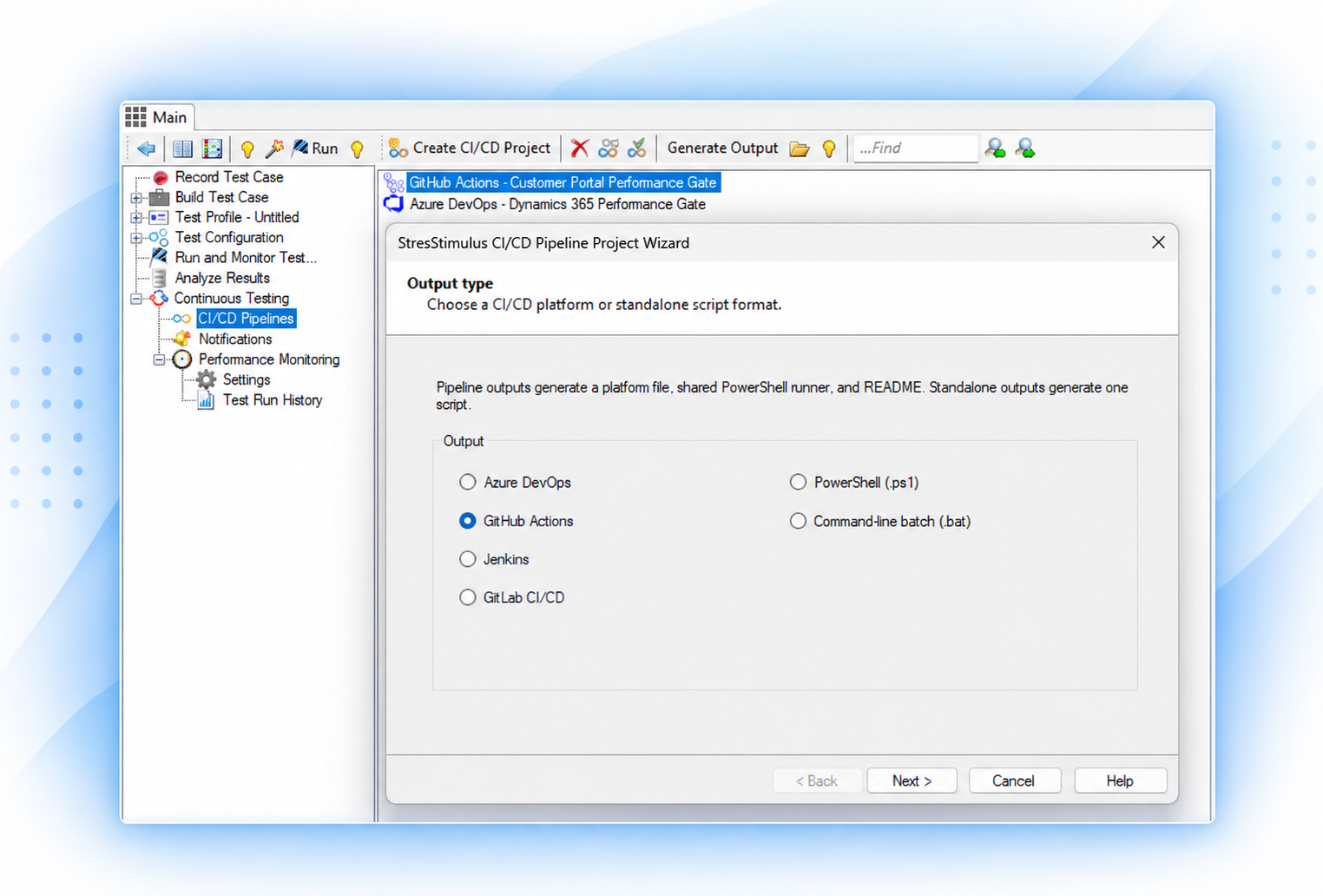
StresStimulus includes a CI/CD project workflow that helps generate the files and commands required to run a configured functional and performance test from common automation platforms. This reduces the amount of custom pipeline scripting needed to get started.
You can also generate standalone PowerShell or batch execution files when you need a simpler command-line integration or want to incorporate StresStimulus into another automation system.
Run the Same Tests in CI/CD
CI/CD execution uses the StresStimulus tests and configurations already created and validated by your QA and performance-testing teams, without requiring a separate version for automated execution. The same functional assertions and performance criteria used by QA can become automated quality gates in your CI/CD pipeline.

GitHub Actions
Generate a workflow for GitHub-hosted repositories using a self-hosted runner.

Azure DevOps
Integrate StresStimulus automated testing into Azure Pipelines.

Jenkins
Run configured tests from Jenkins jobs and pipelines.

GitLab
Automate tests into GitLab CI/CD workflows.

Any CI/CD Platform
Use a custom-generated PowerShell script or the command-line interface (CLI).
Use Functional Assertions and Performance Criteria as Release Gates
A CI/CD pipeline needs a clear pass/fail decision, not just a report. StresStimulus lets you define comprehensive acceptance criteria for automated functional and performance tests.
For protocol-based testing, configure thresholds for response times and 30+ additional performance criteria at applicable test, transaction, API service call, and request levels.
For Playwright browser tests, evaluate more than a dozen browser-level performance and quality measurements, including JavaScript and DOM execution metrics, error counts by category, FCP/LCP, and page loading time. Define thresholds for each measurement and combine individual rules using flexible Boolean logic to enforce complex pass/fail conditions.
Functional assertion results can also contribute to test outcomes, while regression analysis identifies changes across successive executions. These checks provide automated quality gates that help teams detect functional failures, performance degradation, and browser-quality issues before release.
Return Clear Results to the Pipeline
StresStimulus can export concise machine-readable and human-readable summaries after an automated test. JUnit and NUnit reports can integrate with CI test-result views, while JSON and HTML summaries support downstream processing and deeper review.
CI/CD Exit Codes Examples
- 0Success
- 1Test validation or performance criteria failed
- 2Execution failed
- 3Canceled or timed out
- 4Report export failed
Notify the Team When Tests Fail or Performance Changes
Automated testing is most useful when the right people see the result. StresStimulus notifications can be triggered for every run, failures only, or warnings and failures, depending on how each destination is configured.
The same notification workflow can report transaction failures, application errors, pass/fail rule violations, and performance regressions, giving teams one consistent way to surface automated quality problems.
Notification Destinations
- Webhook
- Microsoft Teams
- Slack
Automatically Evaluate Test Results
Apply measurable quality criteria without manual report review.
Configure Pass/Fail Rules using performance metrics, error counts, timeouts, and browser-specific measurements. Define thresholds and Boolean conditions to evaluate results at the test, transaction, and request levels, where applicable.
Functional assertions verify expected application behavior, while performance rules evaluate responsiveness and reliability. Combined evaluations help determine whether an execution meets functional and performance requirements.
To learn more about automated quality gates and pipeline execution, see Monitoring & Regression Testing.
Explore Related Topics
Performance Monitoring & Regression Testing
Use historical baselines and regression detection to identify performance degradation between automated runs.
Learn moreIntegrations & Observability
Connect performance testing with the telemetry and monitoring tools used by your engineering organization.
Learn moreAI-Assisted Performance Diagnostics
Identify slow requests, transactions, server bottlenecks, and other performance problems using detailed test diagnostics.
Learn moreAdd End-to-End Testing to Your Delivery Pipeline
Start with a working StresStimulus test, then reuse it as an automated performance check across builds and releases.