
Automated Functional Testing with Playwright
StresStimulus extends Playwright automation with parallel test execution, data-driven testing, business transaction monitoring, and comprehensive reporting. Import existing Playwright scripts with broad language support, enhance them with StresStimulus capabilities, and run automated functional tests in real browsers.
Validate complex business workflows while benefiting from the same enterprise testing platform used for performance testing at scale.
From Playwright Scripts to Actionable Test Results
Bring existing automation into StresStimulus, enhance it with test data and business transactions, then run and analyze real-browser tests.
Import
Reuse C#, JavaScript, or TypeScript Playwright scripts.
Parameterize
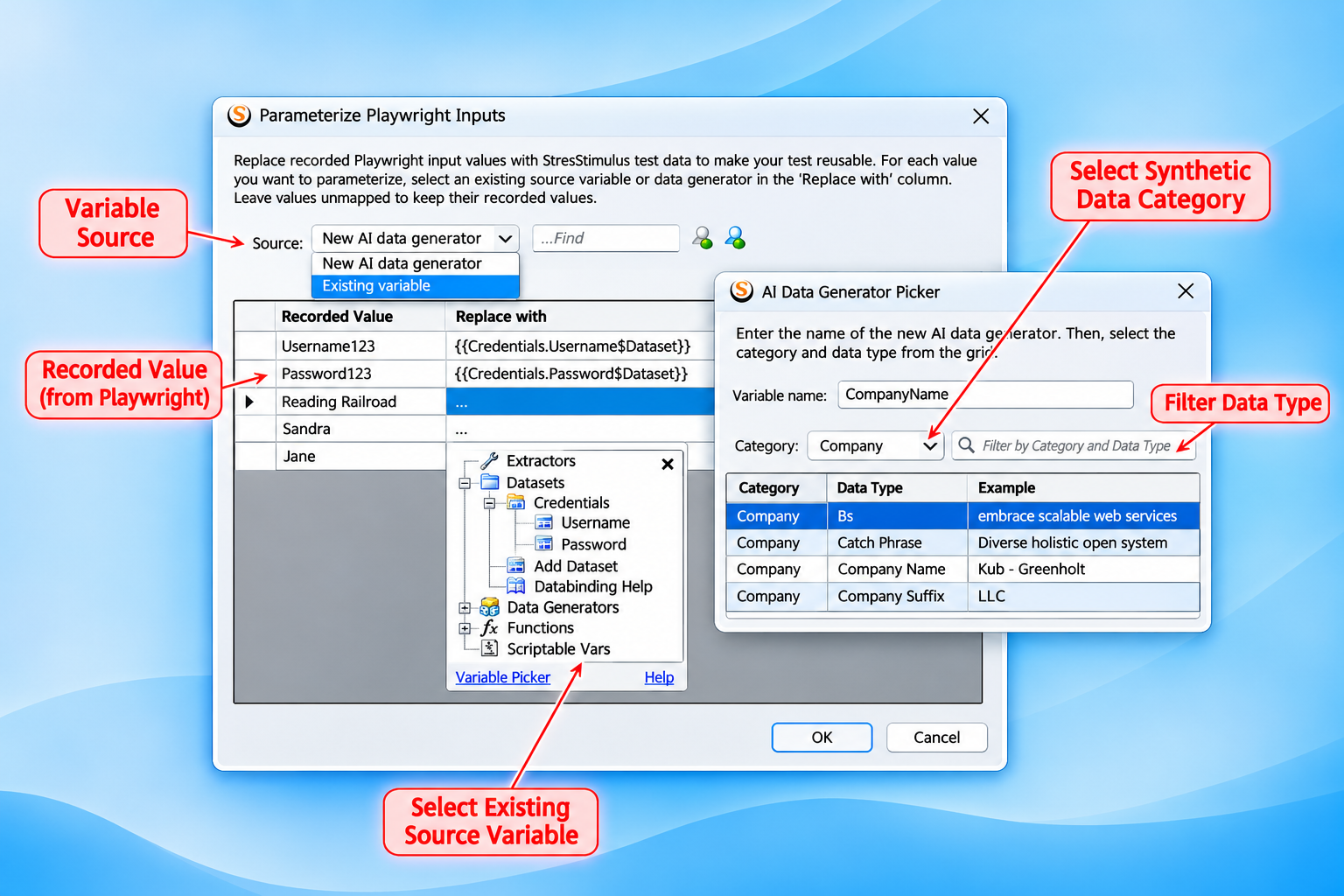
Apply datasets and realistic synthetic business test values.
Define Transactions
Combine user actions into meaningful business steps monitored automatically.
Execute
Run browser tests interactively or from your CI/CD pipeline with calibrated concurrency and repeatability, while validating assertions.
Analyze
Review failures, timings, extensive browser metrics, trends, and regressions using StresSTimulkus and your observability framework.
Bring Playwright Scripts into StresStimulus
Continue creating and maintaining Playwright scripts using familiar development tools. Import existing automation code and turn it into managed browser test cases ready for StresStimulus enhancements. Execute automation tests independently or in conjunction with other functional or performance test cases.
- Use familiar language. Reference your existing C#, JavaScript, and TypeScript Playwright code in StresStimulus.
- Stay synchronized.StresStimulus automatically synchronizes changes to the original Playwright scripts while preserving test case identity, test membership, configuration associations, and execution history.
actions, assertions, locators, waits, helpers, API calls, etc.
Codeless Test Configuration and Data-Driven Testing
Parameterization makes functional testing more versatile by allowing the same Playwright workflows to be tested with different data inputs, user accounts, and business scenarios. StresStimulus replaces hardcoded values with reusable data from managed datasets, functions, scriptable variables, and synthetic data generators. This expands test coverage without requiring additional scripts or code modifications.
- Data-Driven Functional Testing. Execute the same Playwright workflows with different data inputs to validate a wider range of application scenarios.
- Hundreds of Synthetic Data Types. Generate realistic names, addresses, company information, and other business values that resemble real-world data, enabling comprehensive testing without relying on actual customer information.
- Flexible Data Allocation. Configure how unique, sequential, or random values are assigned to browser users and iterations using data-binding algorithms.
- Persistent Codeless Parameterization. Automatically preserve parameterization bindings when Playwright scripts are re-recorded or re-imported, even when other parts of the script change. Bindings remain intact for original input values that have not changed.
Browser users with configurable data allocation on different iterations
Test Business Processes, Not Just Individual Actions
Define meaningful steps in multistep workflows, such as the order approval workflow. Monitor a full range of browser metrics and application behavior for each step while preserving Playwright assertions.
Create business transactions: Set transaction boundaries between actions in Playwright source or create named transactions by grouping actions codelessly in StresStimulus.
Monitor and validate transactions: Collect step timings and Web Vitals and run assertions to monitor and verify expected behavior. Analyze transaction regressions and trends
Fast, Scalable Browser Test Execution
Running large Playwright test suites sequentially can take considerable time, delaying feedback and slowing development cycles. StresStimulus reduces execution time by running multiple browser tests concurrently and distributing them across available local machines and cloud test agents. Scale execution capacity to match your testing needs while maintaining centralized control and consolidated results.
Validate individual test cases with debugging before running larger suites. Execute Playwright assertions and collect consolidated results. Tests can run interactively or through automated CI/CD pipelines.
- Accelerate Testing with Parallel Browsers. Run multiple Playwright tests simultaneously. Reduce the overall duration of functional and regression test suites.
- Scale Execution Across Multiple Machines. Distribute concurrent browsers across Test Agents running on local machines or instantiated automatically in AWS and Azure clouds.
- Test On-Premises and Cloud Applications. Run browser tests within your own network with direct access to internal applications or your private cloud infrastructure.
Understand Application Behavior Beyond Pass or Fail
Review assertion outcomes, execution errors, transaction timings, and web page loading and rendering metrics.
- Detailed execution results. Analyze test-case outcomes, transaction measurements, and individual executions.
- Browser quality metrics. Collect more than a dozen measurements for every transaction, browser user, and iteration, including Web Vitals, lifecycle timings, and JavaScript activity.
- Configurable quality criteria. Set browser metric thresholds and combine pass/fail rules with Boolean logic.
One Business Workflow. Multiple Testing Disciplines.
The same Playwright business scenarios can support browser-based performance measurements, functional validation under load, and derived protocol-based performance test cases to enable large-scale load testing while using system resources efficiently. Reduce duplicated scripting effort across testing domains.
Browser Performance
Evaluate real-browser experience during Playwright execution.
Functional Validation Under Load
Check business workflows while concurrent demand is generated.
Protocol-Based Load Tests
Automatically generate protocol test cases from Playwright functional scenarios, without re-recording, while preserving transaction definitions. Simplify correlation between functional and load testing results.
Explore Related Topics
Functional Testing Under Load
Validate browser workflows while protocol virtual users generate load.
Learn morePerformance Monitoring & Regression Testing
Track performance changes and evaluate quality criteria across test runs.
Learn moreContinuous Testing & CI/CD
Integrate automated testing into development and release workflows.
Learn moreAutomate Functional Testing with StresStimulus
Reuse Playwright automation, validate complex business workflows, and gain enterprise-grade testing capabilities in one integrated platform.